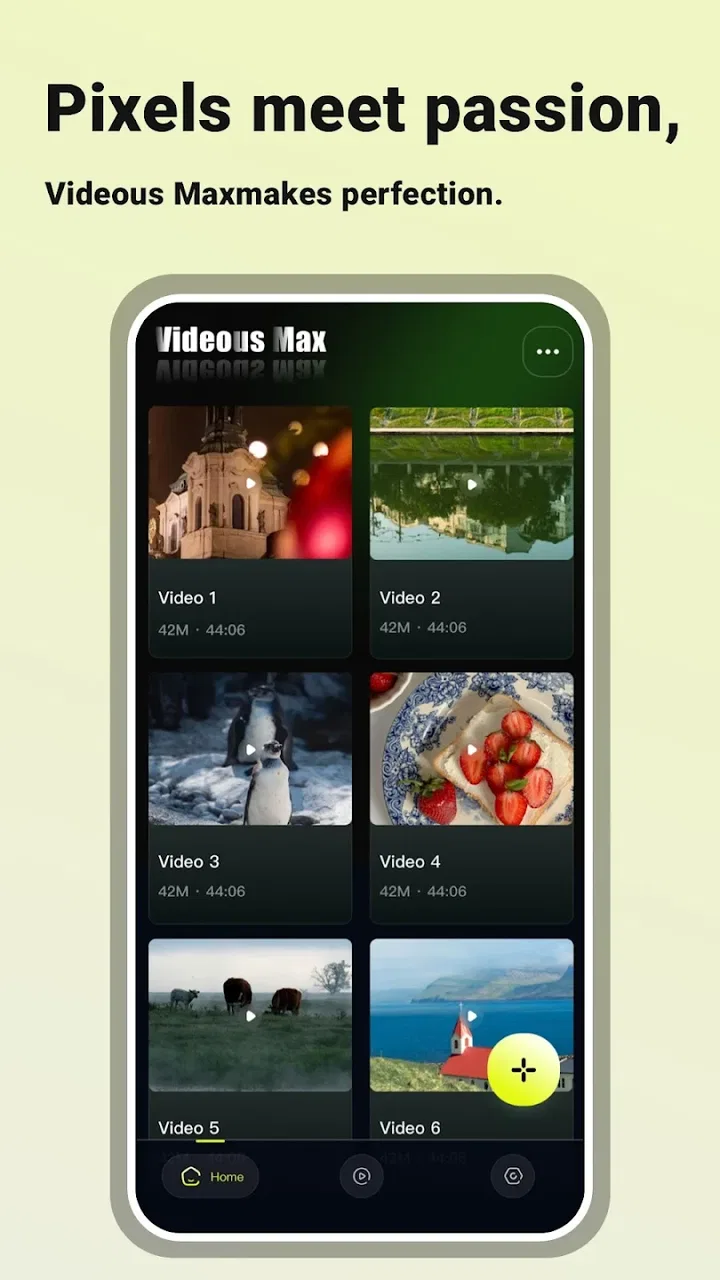
Videous Max-Zero Hassle
- 4.3
- Rating
- 10.00K
- Installs
- Free
- Price

 Analysis by App-foxy
When I first opened Videous Max, I approached it as a quick entertainment editor rather than a full production suite. That distinction matters. Its promise is centered on making cuts smoother and helping everyday users improve a video without turning the process into a technical project. For someone who wants to tidy a clip before sharing it, that focus feels approachable.
This is a free Android app from Tech Mahfuj, listed for Everyone and compatible with Android 7.0 or later. It belongs to the entertainment category, so I would place it closer to a practical clip-polishing tool than to a serious desktop-style editing workstation. The current version is 1.0.1, and the app has already passed the ten-thousand-install mark with a 4.3 average from roughly fifty ratings. Those figures suggest an early but encouraging audience rather than a mature editing platform with years of accumulated features.
My overall impression is simple: it is most useful when the problem is a video that needs a cleaner beginning, a tighter ending, or more confident pacing. If you are looking for an editor with a deep effects library, advanced audio mixing, or a large ecosystem of templates, I would look elsewhere. If you want to make a small improvement without learning a complicated workflow, this app has a clearer reason to exist.
You May Also Like

 AccuWeather: Weather Radar
AccuWeather Review: A Quick, Clear Forecast for Everyday Decisions
For everyday plans, the best forecast is the one you can understand quickly. AccuWeather makes rain timing, radar, and local conditions easy to act on, with a few trade-offs.

 Hill Climb Racing
Why Hill Climb Racing Still Turns Crashes Into One More Run
A tiny car, a bumpy hill and one more upgrade: Hill Climb Racing keeps resurfacing because its simple chaos makes every near-miss feel personal.

 AliExpress - Shopping App
AliExpress Makes Global Shopping Feel Personal, but Shoppers Bear the Risk
AliExpress turns a global marketplace into a pocket-sized discovery engine. Its reach is useful, its shopping loop compelling, and its trade-offs easy to miss.

 Lords Mobile: Kingdom Wars
Lords Mobile Is a Kingdom-Building Routine, Not a Quick Match
A case-by-case verdict on the building, battles, device demands, and social commitments that make Lords Mobile rewarding for some players and exhausting for others.

 PDF Scanner app - TapScanner
TapScanner Makes Paperwork Easier to Capture, Check, and Share
TapScanner makes scanning with a phone feel less like a rescue operation and more like a dependable step in getting work done. Its capture tools are useful, though not flawless.

 Block Blast!
 Shows How Much a Puzzle Game Can Leave Out
A quiet grid game shows why puzzle players increasingly value instant clarity, repeatable skill and low-pressure play—and where the genre still needs to catch up.
More From Our News Desk
View All News


What the first editing session feels like
The best way to understand this app is to start with a modest goal. Do not begin by trying to assemble a long montage or recreate a social-media trend. Pick one ordinary clip from your phone: a family moment with too much waiting at the beginning, a travel shot that runs on after the interesting part, or a short recording where the useful action is surrounded by dead space.
That kind of material matches the app’s strongest apparent purpose. A smooth cut is not only about removing seconds. It is about deciding where the viewer should enter the moment and where the scene should end. In my experience, a small adjustment at either edge can make a casual recording feel much more intentional, even when nothing else changes.
The store summary describes the app as having what users need to level up their edits, but I would interpret that carefully. It does not mean every professional editing task will fit comfortably here. It means a first-time user can approach it with a basic improvement in mind instead of feeling obliged to master a large collection of controls.
The most useful mindset is to treat each edit as a small communication decision. Ask what the viewer needs to see, what can be removed, and whether the final moment ends naturally. That approach prevents a common beginner mistake: adding changes simply because an editing tool makes them possible.
Getting from installation to a workable project
After installing the app, I would begin with a single video rather than a folder of clips. This keeps the first session easy to understand and makes it obvious whether the result is actually better. If you choose several files immediately, it becomes harder to tell whether a problem comes from the original footage, the ordering, or the editing process.
Before making a cut, watch the entire clip once. That sounds obvious, but it is one of the most useful habits for a new editor. You need to know where the natural action starts, whether the camera settles after a few seconds, and whether the ending contains a useful reaction. Cutting only from the thumbnail or the opening frame can remove context that makes the scene understandable.
Once the video is open, look for the controls that let you define the section worth keeping. The first successful project should involve one clear change: remove an awkward lead-in, shorten a pause, or trim away the moment after the action has finished. Save or export that result, then watch it from beginning to end. The goal is not to produce something dramatic. The goal is to prove that the app can turn an unpolished clip into a more watchable one.
A practical tip is to keep the original file untouched. Work from a copy whenever your phone’s file manager makes that easy. This gives you freedom to try a tighter cut without worrying that a second attempt will be impossible if the first version feels too aggressive.
Your first meaningful success
For a realistic first project, imagine recording a friend blowing out candles at a birthday gathering. The camera starts several seconds before anyone is ready, the important moment happens quickly, and the clip continues while people move around afterward. In Videous Max, I would remove the waiting period, preserve the candle moment, and end shortly after the reaction.
That workflow teaches three valuable editing judgments. First, the opening should give the viewer enough context without making them wait. Second, the central action deserves room to breathe rather than being cut at the exact instant it begins. Third, the ending should feel deliberate, not like the person holding the phone forgot to stop recording.
After the first pass, watch the result with the sound on and off if the app and your device allow normal playback in both situations. Without sound, you can judge whether the visual flow works. With sound, you may notice that a cut interrupts a sentence, a laugh, or an important reaction. This is a non-obvious trade-off: the visually shortest version is not always the most natural version.
I also recommend making two versions when you are unsure. One can be tightly trimmed, while the other leaves a little more breathing room around the action. Comparing them immediately is often easier than trying to decide from memory. It also helps you learn your own preference: some clips benefit from speed, while others need a calm lead-in to make the moment meaningful.
Where beginners may hesitate
The first confusion is likely to come from expecting every editor to behave like the most popular alternatives. Many familiar apps present a large timeline, prominent effect buttons, music tools, filters, text options, and sharing shortcuts all at once. A more focused tool can feel limited simply because it asks you to concentrate on the clip itself rather than displaying every possible enhancement.
That difference is not automatically a weakness. For a first-time user, fewer visible decisions can make the path to a finished result less intimidating. On the other hand, if your project depends on several layers, detailed sound work, animated captions, or elaborate transitions, a lightweight entertainment editor may slow you down because you will eventually need to move the project to a more capable alternative.
Another point of friction is judging the exact cut. A beginning that looks clean on a still frame can feel abrupt in motion. I would make the cut, play a few seconds before it, and then continue beyond it. Reviewing only the selected section hides the rhythm of the transition. This is especially important when the person or camera is moving, because a cut made in the middle of a gesture can look harsher than the same cut during a natural pause.
Do not assume that a smoother edit means every pause should disappear. Silence, a glance, or a short empty space can provide emotional timing. Removing all of them may make a personal video feel rushed. I found that the app is better used as a tool for removing distractions than as an instruction to make every clip as fast as possible.
Choosing the right kind of project
Videous Max makes the most sense for short, self-contained videos. A quick birthday clip, a pet doing something unexpected, a small travel moment, or a product demonstration recorded for a friend are all sensible starting points. These projects have a clear subject and usually need a few decisive cuts rather than a complicated production plan.
It is also useful for people who are uncomfortable with traditional editing software. A first-time user may not want to compare export presets, organize multiple tracks, or learn a large set of icons before making one usable clip. The app’s appeal is that it can serve as a low-pressure introduction to the basic habit of editing: keep the meaningful part and remove what weakens it.
I would skip it for a project that needs a polished presentation with many moving parts. A school documentary, a long interview, a music-driven montage, or a business video with precise branding usually benefits from a fuller editor. Those alternatives may take longer to learn, but they offer more control when timing, audio, text, and visual consistency all matter at once.
There is also a useful middle ground. You can use this app for the rough first pass, then continue elsewhere if the clip grows in ambition. For example, trim the obvious waiting time here, review the pacing, and only then decide whether the remaining work justifies a more complex editor. That prevents you from spending time learning advanced software for a video that only needed a simple cleanup.
Small workflow choices that improve the result
One of my favorite practical habits is to edit for the intended viewer, not for yourself as the person who recorded the clip. You already remember what happened, so you may tolerate long pauses that a friend will find confusing. Imagine someone seeing the video without any background. If the first few seconds do not explain why the moment matters, tighten them.
A second useful technique is to identify the emotional endpoint before trimming the beginning. If the important part ends with a laugh, a reveal, or a reaction, leave enough time afterward for that response to register. Cutting immediately after the main action can make the video feel unfinished. This is a subtle trade-off that a generic description will not teach: the strongest ending is often one beat later than the obvious ending.
A third is to create a naming habit for saved versions. Use simple labels such as “tight cut” and “roomier cut” rather than repeatedly overwriting the same file. This is particularly helpful when you are preparing a clip for different audiences. A private family version may keep more context, while a quick message to a friend may work better with a shorter opening.
Finally, check the finished file outside the editing screen. Watch it from your gallery or the normal video player before sharing. The editing view is for making changes; the regular playback view is where you discover whether the result feels natural as a complete video. If the clip looks good only while you are focused on the controls, it is not finished yet.
How it compares with familiar alternatives
Compared with a phone’s built-in trimming tool, this app is attractive when you want an editing experience that feels more deliberate than simply dragging the start and end handles. The built-in option is often enough for a single cut, and it may be preferable when speed and familiarity matter most. Videous Max becomes more appealing when you want to think about the rhythm of the clip and make the improvement feel like an actual editing session.
Compared with large social-video editors, it appears better suited to users who do not want a crowded workspace. Those apps can be stronger for templates, music-led edits, captions, effects, and direct publishing workflows. Their downside is that a simple trim can become surrounded by choices you do not need. This app’s focused identity is useful when your priority is a clean result rather than a highly decorated one.
Compared with desktop software, the difference is even clearer. Desktop editors are the better choice for long timelines, detailed audio alignment, color work, and projects that need repeatable precision. A mobile app is more convenient for a quick personal clip, but convenience should not be confused with unlimited control. I would choose Videous Max for speed and accessibility, not for a professional finishing pipeline.
What to expect from the current release
The app is still presented as a relatively early release, with version 1.0.1 currently available. That makes the experience feel like a starting point rather than a finished answer to every editing need. The rating of 4.3 from about fifty ratings is encouraging, and the audience of more than ten thousand installs shows that people are trying it, but I would still keep expectations realistic.
Early apps can be perfectly useful while also leaving room for refinement. You may notice that a focused workflow does not cover every edge case, especially if you arrive with expectations shaped by feature-heavy editors. My advice is to judge it against the job you actually need done. If the job is a cleaner short clip, the app can be a sensible fit. If the job is a complete production, its simplicity becomes a limitation rather than an advantage.
Because it is free, the barrier to testing that fit is low. I would still avoid installing it with the assumption that free automatically means effortless for every project. The real value comes from matching the tool to a narrow, achievable task and checking the exported result before deleting the original or sending the video to someone else.
My recommendation for a first-time user
Start with a clip you can afford to experiment with, watch it fully, and make one purposeful cut. Then review the complete result outside the editor. If the video feels clearer and more natural, try a second clip where the main challenge is an awkward ending rather than a slow beginning. These two exercises reveal more about the app than randomly tapping through every control.
I would recommend Videous Max to Android users who want a straightforward way to improve short personal videos and who appreciate a less intimidating starting point. It is especially suitable when the desired result is “cleaner and easier to watch,” not “packed with effects.” The Everyone age rating also makes its general audience broad, although the right choice still depends on the complexity of the project.
I would point a serious creator, frequent social publisher, or anyone building a layered presentation toward a more advanced alternative. That is not a criticism of this app’s purpose; it is a reminder that a focused cutter cannot replace a full editing environment. Choosing the simpler tool is smart when the task is simple, and frustrating when the task has already outgrown it.
My final view is that Videous Max is worth trying as a low-pressure first step into mobile video editing. It does not need to transform every recording to be useful. If it helps you recognize the important moment, remove the waiting around it, and finish on a natural beat, it has done its job well. For a free entertainment app from Tech Mahfuj, that focused path from installation to a meaningful first result is its strongest quality.
FAQs for Videous Max-Zero Hassle
01What is Videous Max-Zero Hassle?
Videous Max-Zero Hassle is a user-friendly app designed for seamless video editing on both Android and iOS devices. It offers a range of features such as trimming, merging, adding effects, and exporting videos in various formats. The app is suitable for both beginners and experienced editors looking for a hassle-free experience.
02Is Videous Max-Zero Hassle free to use?
Videous Max-Zero Hassle offers a free version with basic features, allowing users to perform essential video editing tasks. However, for access to advanced features like premium effects and high-resolution exports, users can opt for a subscription model, which offers a more enhanced editing experience.
03What are the system requirements for Videous Max-Zero Hassle?
To run Videous Max-Zero Hassle smoothly, your device should have at least Android 7.0 or iOS 11.0. A minimum of 2GB RAM is recommended for optimal performance, especially when editing large video files or using intensive features like 4K exports and complex effects.
04Can I share my edited videos directly from the app?
Yes, Videous Max-Zero Hassle allows users to share their edited videos directly to social media platforms such as Instagram, Facebook, and YouTube. The app provides various export options that are optimized for each platform, ensuring your content looks its best wherever it's shared.
05Does Videous Max-Zero Hassle support 4K video editing?
Videous Max-Zero Hassle supports 4K video editing, allowing users to create high-quality content. However, editing 4K videos requires a device with sufficient processing power and memory. Premium features may be necessary to fully utilize 4K capabilities, ensuring smooth editing and exporting.
Pros
- User-friendly interface for easy navigation.
- Wide variety of video editing tools.
- Fast export times with no quality loss.
- Regular updates with new features.
- Supports multiple video formats.
Cons
- Limited cloud storage options.
- Some features locked behind paywall.
- Occasional in-app ads can be disruptive.
- Requires a stable internet connection.
- No direct social media sharing options.

Videous Max-Zero Hassle
Gallery